Browserbase vs Steel vs Anchor Browser: 2026 guide
In short: Steel is the open-source pick - Apache 2.0 core, self-hostable, and the lowest published browser-hour rate at $0.08 on its $250/month Scale plan. Anchor Browser is the enterprise pick, selling authenticated sessions and compliance claims from $50 to $2,000/month plus usage. Browserbase is the ecosystem pick: Stagehand, Search and Fetch APIs, verified SOC 2 Type II, and plans from free to custom Scale. GodHands, a two-person YC Fall 2026 startup, is pre-launch with a publicly ambiguous product story. All three established tools publish real pricing - rare and welcome in infrastructure.
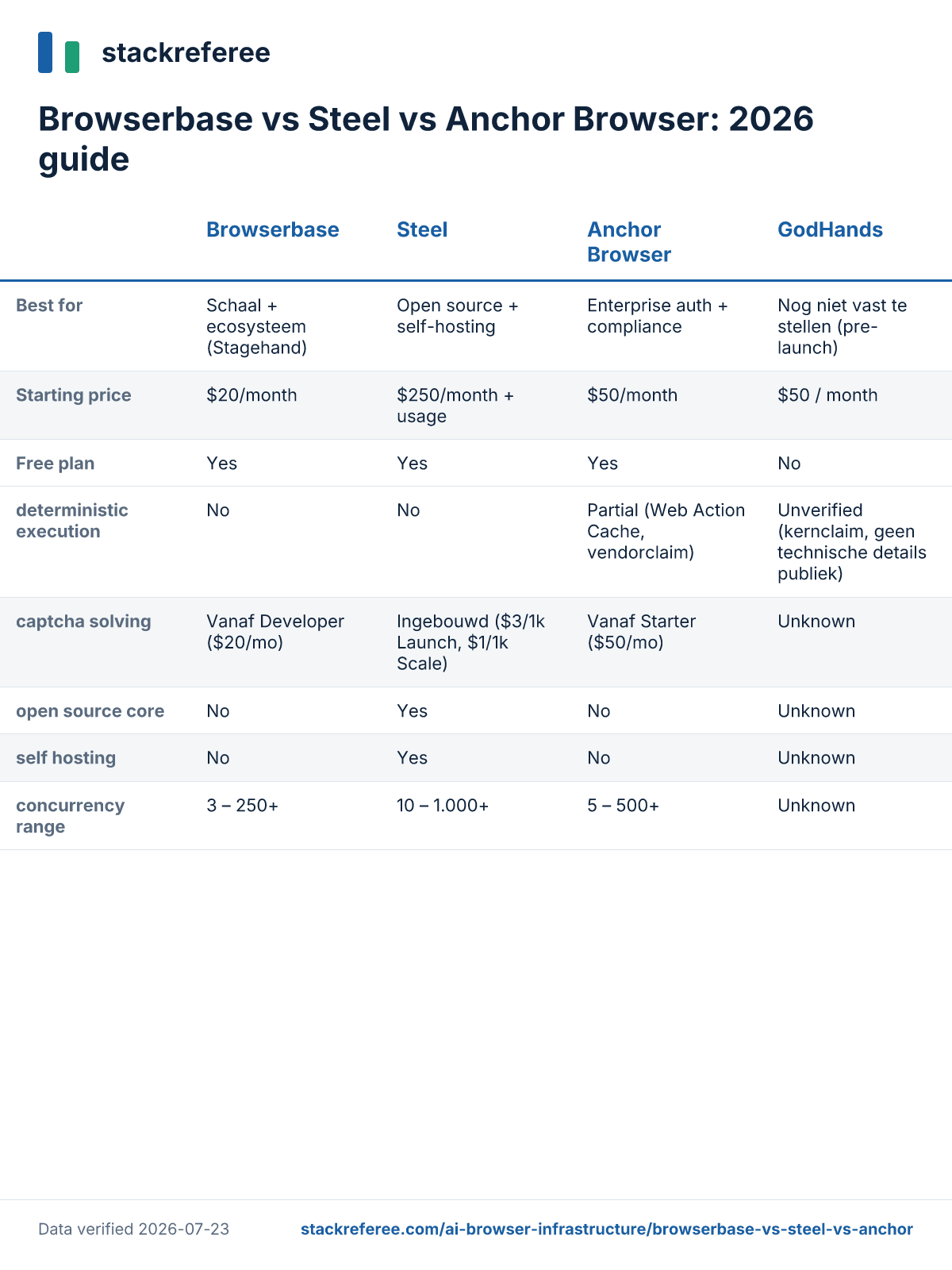
Comparison at a glance
| Steel | Anchor Browser | Browserbase | GodHands | |
|---|---|---|---|---|
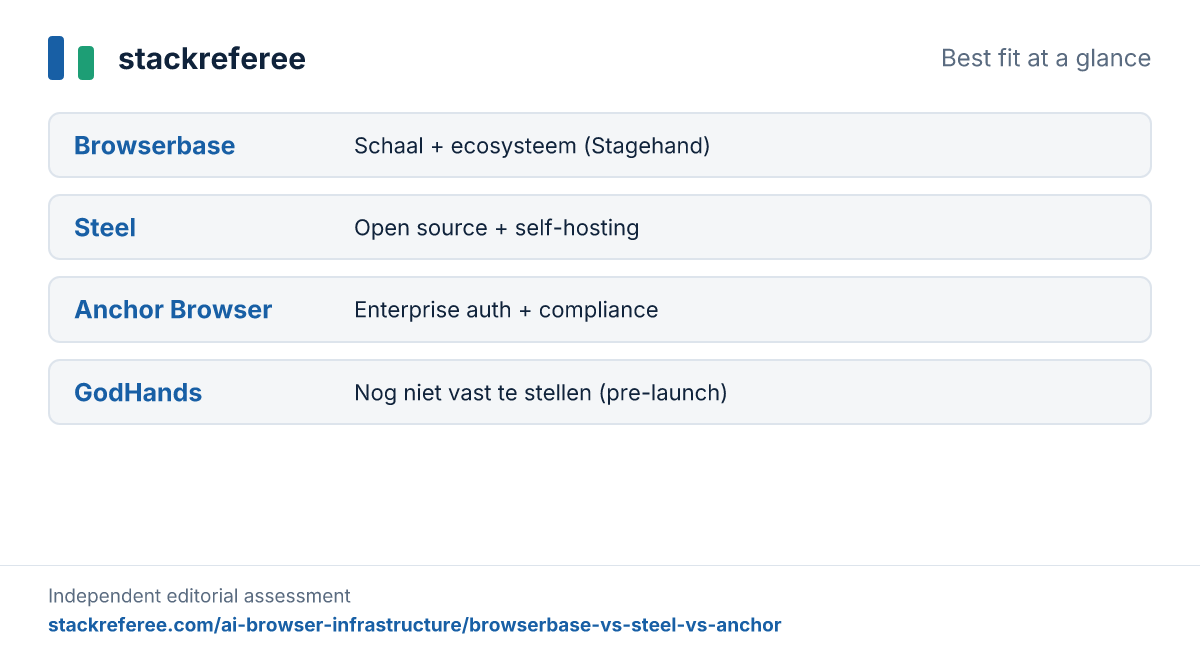
| Best for | Open source + self-hosting | Enterprise auth + compliance | Scale + ecosystem | Undetermined (pre-launch) |
| Entry paid plan | $250/mo Scale (+usage; free Launch tier) | $50/mo Starter (+usage) | $20/mo Developer (+usage) | Not buyable yet |
| Browser hour rate | $0.10 Launch / $0.08 Scale | $0.05 (+$0.01 per browser) | $0.12 Developer / $0.10 Startup overage | Unknown |
| Concurrency range | 10 - 1,000+ | 5 - 500+ | 3 - 250+ | Unknown |
| Open source core | Yes (Apache 2.0, 7.4k stars) | No | No (Stagehand SDK is) | Unknown |
| Captcha solving | Built-in, $1-3/1k | From Starter plan | From Developer plan | Unknown |
| SOC 2 | No public claim | Type 2 claimed on site* | Type II verified in docs | "In preparation" per site |
*Anchor's SOC 2 Type 2 and ISO 27001 are claims on its own site (from the Growth plan up) that we could not independently verify - the distinction with Browserbase's documented certification dates matters if compliance is your buying criterion.
This category - cloud browsers built for AI agents to drive - barely existed three years ago. It's now crowded enough that independent third parties compare exactly these vendors against each other, which is how we confirmed the comparison set. Unusually for infrastructure, all three established players publish detailed pricing, so this article can do real math. Everything below was verified on vendor sites and review platforms on July 23, 2026; where verification failed, we say so per our editorial policy.
What is Steel?
Steel is an open-source browser API for AI agents. The core product, steel-dev/steel-browser, is on GitHub under an Apache 2.0 license with 7.4k stars and 950 forks, and can be self-hosted with Docker. The commercial cloud runs browser fleets with session management, context reuse, built-in captcha solving and a Session Viewer for live and recorded debugging. SDKs exist for Python and Node.js, and Steel advertises compatibility with Puppeteer, Playwright and Selenium - its pitch is a one-line change to point existing automation at its cloud.
Steel launched publicly on Hacker News in late 2024, where founders Hussien Hussien and Nasr Mohamed fielded both compliments on the documentation and pointed skepticism - more on that in the quotes section. A Fly.io customer story reports thousands of users on the free plan and hundreds paying, which is vendor-adjacent evidence rather than independent proof. Company facts beyond that are murky: secondary sources conflict on founding year, location and funding, and Steel's own materials don't say. We treat all Steel funding figures as unverified.
What is Anchor Browser?
Anchor Browser sells secure browser infrastructure for computer-use agents, aimed squarely at enterprises. Its differentiators are identity and stealth: authenticated browser access (sessions that hold logins), a hardened Chromium fork the company says passes as human, automated captcha bypass from the Starter plan, and an enterprise VPN built in. It claims a partial answer to determinism too - a Web Action Cache for repeatable workflows, which the company says cuts token usage dramatically compared to runtime AI. Those performance multipliers are vendor claims.
The company was founded in October 2024 in Israel by Idan Raman, Dor Dankner and Guy Ben-Simhon, veterans of Unit 8200, and raised a $6M seed led by Gradient Ventures and Blumberg Capital in November 2025 - details from press coverage summaries rather than first-party pages. On compliance, Anchor's site claims SOC 2 Type 2, ISO 27001 and GDPR from the Growth plan, plus HIPAA BAA and RBAC at Enterprise. We could not independently verify those certificates, and flag that in the compliance discussion below.
What is Browserbase?
Browserbase is the best-funded and most visible company in the category. It runs headless browser infrastructure for AI agents - sessions, proxies, stealth tiers, captcha solving - plus a widening product surface: Search and Fetch APIs, session replay and logging, and Stagehand, its open-source browser automation framework, which the company calls the most popular in its class. Press coverage reports a $40M Series B at a $300M valuation with $67.5M raised in total; those figures come from search summaries of SiliconANGLE and Tracxn, not pages we fetched directly.
Scale claims on its site are aggressive - tens of millions of browser sessions, six-figure developer counts, logos from Microsoft to DeepMind - and all are vendor claims. What we could verify directly is its compliance posture, which is the strongest documented in this comparison: SOC 2 Type I certified October 2024 and Type II September 2025 per its docs, HIPAA BAAs on Scale, region choice across the US, EU and Asia, and one-browser-per-VM isolation with machines destroyed after each session.
What is GodHands?
GodHands is where our verification process earned its keep. The YC Fall 2026 profile describes deterministic computer-use infrastructure for AI agents - the reason it's in this article. The website's metadata describes infrastructure for deterministic desktop automation. But the application content inside the site's own JavaScript bundle describes something else entirely: a documentation product that detects drift between code and docs and updates them on every pull request, with integrations for Notion, Confluence, GitBook, ReadMe, Mintlify, Docusaurus, GitHub and GitLab.
A pivot, a second product, or a stale site - we can't tell, and rather than pick the story that fits this article, we're showing you the contradiction. What's verifiable: founded 2026 in San Francisco by Sai Vamshi Batchu, previously a quantitative researcher at HFT firm Graviton, team of two, YC Fall 2026. Security page text says SOC 2 is in preparation, data is analyzed in-flight and discarded, and never trained on - all self-claims. There are no reviews, no case studies and no public pricing. If deterministic agent infrastructure is what ships, it would target a real gap - none of the three incumbents offers deterministic execution - but today that's a hypothesis, not a product you can evaluate.
Pros and cons
Steel
Pros
- The only self-hostable option here. Apache 2.0 core with Docker deployment means no vendor lock-in and a credible exit path - unique in this comparison.
- Lowest published browser-hour rate. $0.08/hour on Scale ($0.10 on the free Launch tier), with captcha at $1/1k and proxies at $6/GB on Scale - the sharpest unit pricing of the three.
- Documentation that impressed its toughest audience. "beautiful docs + api ref!" was the reaction on its Hacker News launch - a crowd not known for generosity.
Cons
- No public SOC 2 claim. For teams whose customers ask compliance questions, Steel's public record is thin: a HIPAA-ready BAA on Scale, but no attestation we could find.
- Short sessions until you pay up. 15-minute maximum session duration on Launch and 1 hour on Scale; only Enterprise unlocks 24-hour sessions - a real limit for long-running agent tasks.
- Recently restructured pricing. Third-party articles still show an older $29/$99/$499 plan structure; the live pages show Launch/Scale/Enterprise. Fresh pricing is fine - churn in pricing models is worth watching.
Anchor Browser
Pros
- Authenticated sessions as a product. Holding logins securely for agents is the hard, unglamorous problem enterprises actually have; Anchor builds its identity infrastructure around it, with a 1Password partnership on its site.
- Cheapest metered browser time on paper. $0.05 per browser hour plus $0.01 per browser created undercuts both rivals' hourly rates - though AI steps ($0.01-$0.10 each) can dominate the bill depending on workload.
- Developer experience praised independently. "Their API was so easy to set up so kudos to them!" per a Hacker News user we found outside Anchor's own marketing.
Cons
- The pricing cliff. Plans jump from $50/month (25 concurrent) straight to $2,000/month (200 concurrent) with no published middle tier - awkward for teams that outgrow Starter gradually.
- Compliance is claimed, not demonstrated. SOC 2 Type 2 and ISO 27001 appear as site claims gated to the Growth plan; we found no independently verifiable attestation, in contrast to Browserbase's dated certifications.
- No critical reviews exist - which is itself a data point. Most public praise consists of testimonials on Anchor's own site. We found no independent critical feedback anywhere, so buyer references matter more than usual.
Browserbase
Pros
- The most verifiable compliance posture. SOC 2 Type II (September 2025), HIPAA BAAs, EU and Asia data residency, and per-session VM destruction - documented in public docs, not just claimed.
- Ecosystem breadth. Stagehand for automation, Search and Fetch APIs for retrieval, session replay for debugging - reviewers on Product Hunt credit it with making agent browser sessions dramatically easier to run.
- A real free tier and a $20 on-ramp. Free (3 browsers, 1 hour) into Developer at $20/month with 100 included browser hours makes it the cheapest way to start in this category.
Cons
- Priciest unit economics at scale. $0.12/hour overage on Developer and $10-12/GB proxies sit above Steel's Scale rates; the value argument rests on the ecosystem, not the meter.
- Beginner friction and performance complaints exist. A Product Hunt reviewer asks for more built-in tutorials and reports occasional slowdowns on heavy AI tasks.
- Community wariness about platform power. Its Cloudflare identity collaboration drew the sharpest independent criticism we found - "Comes across a bit land-grabby" - worth reading if open standards matter to your stack.
GodHands
Pros
- Targets the category's genuine gap. None of the incumbents offers deterministic execution; Anchor's Web Action Cache is the only partial move. If GodHands ships what its YC one-liner promises, the positioning is real.
- Strong data-handling stance on paper. In-flight analysis with immediate discard and a no-training commitment - self-claims, but the right defaults for enterprise buyers.
- Founder pedigree fits the determinism pitch. A quantitative-research background at an HFT firm is credible preparation for building reproducible, low-latency execution systems.
Cons
- The product story contradicts itself publicly. YC profile, site metadata and site application content describe different products; until that resolves, evaluation is impossible.
- Pre-launch in every practical sense. No reviews, no case studies, no working checkout - the $50/month figure in its code is explicitly disabled and not an official price.
- SOC 2 is not done. The site itself says the certification is in preparation - a waiting reason for the enterprise buyers the determinism pitch would attract.
Which tool fits which team?
Solo developer or early-stage agent product. Start with Browserbase's free tier or $20 Developer plan, or Steel's Launch tier with its one-time $30 credits. Both let you validate an agent workflow for pocket money; pick Steel if you suspect you'll want self-hosting later.
Scaling startup watching unit costs. Steel's Scale plan at $250/month with $0.08 browser hours and $6/GB proxies is the sharpest published price. Do the math against Browserbase's Startup plan ($99/month, 500 hours included) for your actual usage curve - included hours can beat lower rates at moderate volume.
Enterprise with authentication and compliance requirements. Anchor Browser if persistent authenticated sessions are the core need and its compliance claims check out in your vendor review; Browserbase if documented certifications and data residency options decide it. Ask Anchor directly for its SOC 2 report - claims on a pricing page aren't an attestation. Teams evaluating vendors on compliance posture may find our compliance automation comparison useful for how to read such claims.
Anyone needing deterministic execution. Nobody sells it today. Anchor's Web Action Cache is a partial answer; GodHands promises it but is pre-launch with an ambiguous public story. If this is a hard requirement, you're building it yourself for now.
Pricing
All three established vendors publish real pricing - refreshingly rare. The structures differ enough that direct comparison needs care: Browserbase bundles included hours into flat tiers, Steel is credits plus metered usage, Anchor meters nearly everything.
Steel pricing
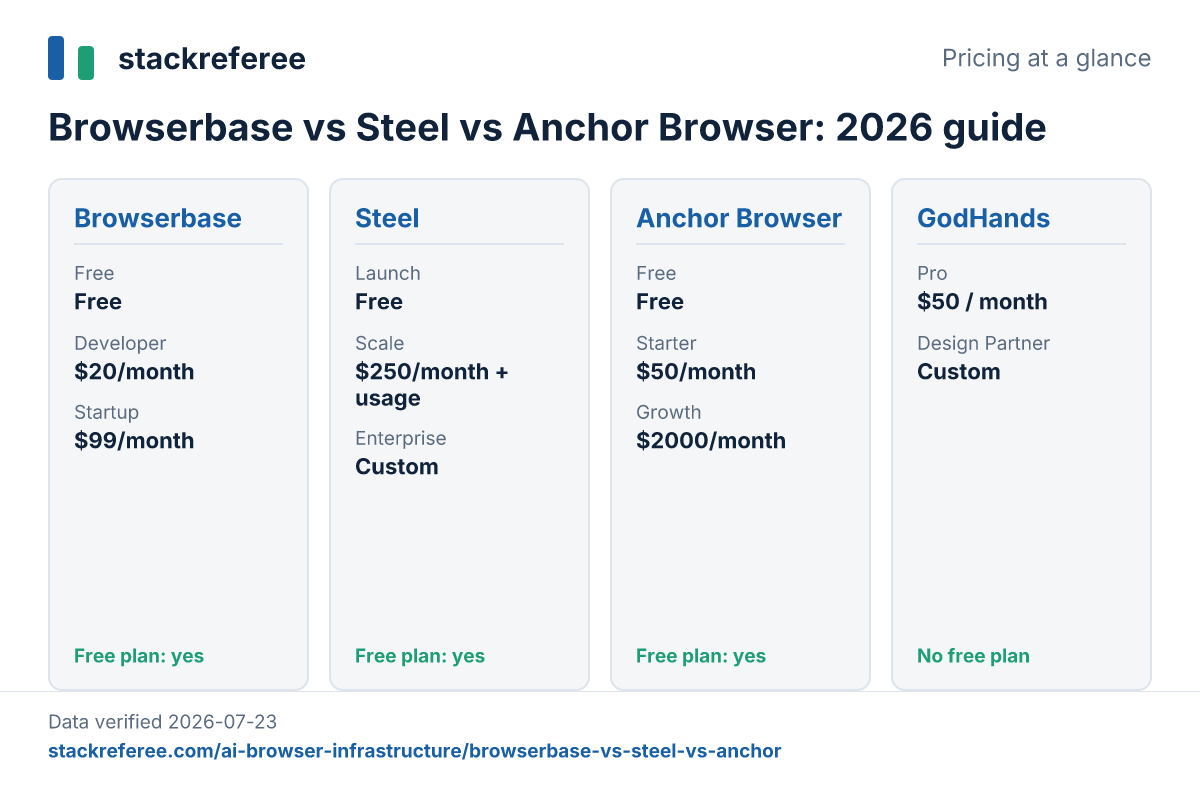
Launch is free with a one-time $30 credit grant, then $0.10 per browser hour, $10/GB proxies, $3/1k captcha solves, 10 concurrent sessions and 15-minute max sessions, billed per minute. Scale is $250/month including $100 monthly credits, dropping rates to $0.08/hour, $6/GB and $1/1k, with 100 concurrent sessions, 1-hour sessions, Enterprise SSO and a HIPAA-ready BAA. Enterprise is custom: 1,000+ concurrent, 24-hour sessions, stealth browser and reserved pools. Pricing verified on July 23, 2026.
Anchor Browser pricing
Free includes $5 monthly credits and 5 concurrent browsers. Starter is $50/month with 25 concurrent browsers, authenticated browser access and captcha bypass. Growth is $2,000/month with 200 concurrent browsers and code execution. Enterprise is custom at 500+ concurrent. Usage applies on every plan: $0.01 per browser created, $0.05 per browser hour, $8/GB proxy, and AI steps from $0.01 to $0.10 depending on model tier. Pricing verified on July 23, 2026.
Browserbase pricing
Free gives 3 concurrent browsers, 1 browser hour, 3 agent runs and 1,000 Search and Fetch calls with 15-minute sessions. Developer is $20/month: 25 concurrent, 100 included browser hours ($0.12/hour after), 1GB proxy ($12/GB after), captcha solving and Basic Stealth. Startup is $99/month: 100 concurrent, 500 included hours ($0.10 after), 5GB proxy ($10/GB after) and 30-day retention. Scale is custom with 250+ concurrent, Advanced Stealth, HIPAA BAA, DPA and SSO. Pricing verified on July 23, 2026.
GodHands pricing
No public pricing exists. A Pro plan at $50/month appears inside the site's billing code with checkout explicitly disabled, alongside a custom Design Partner tier; the FAQ directs buyers to book a call. We report this as an artifact of the site's code, not as an official price. Pricing verified on July 23, 2026.
What users say
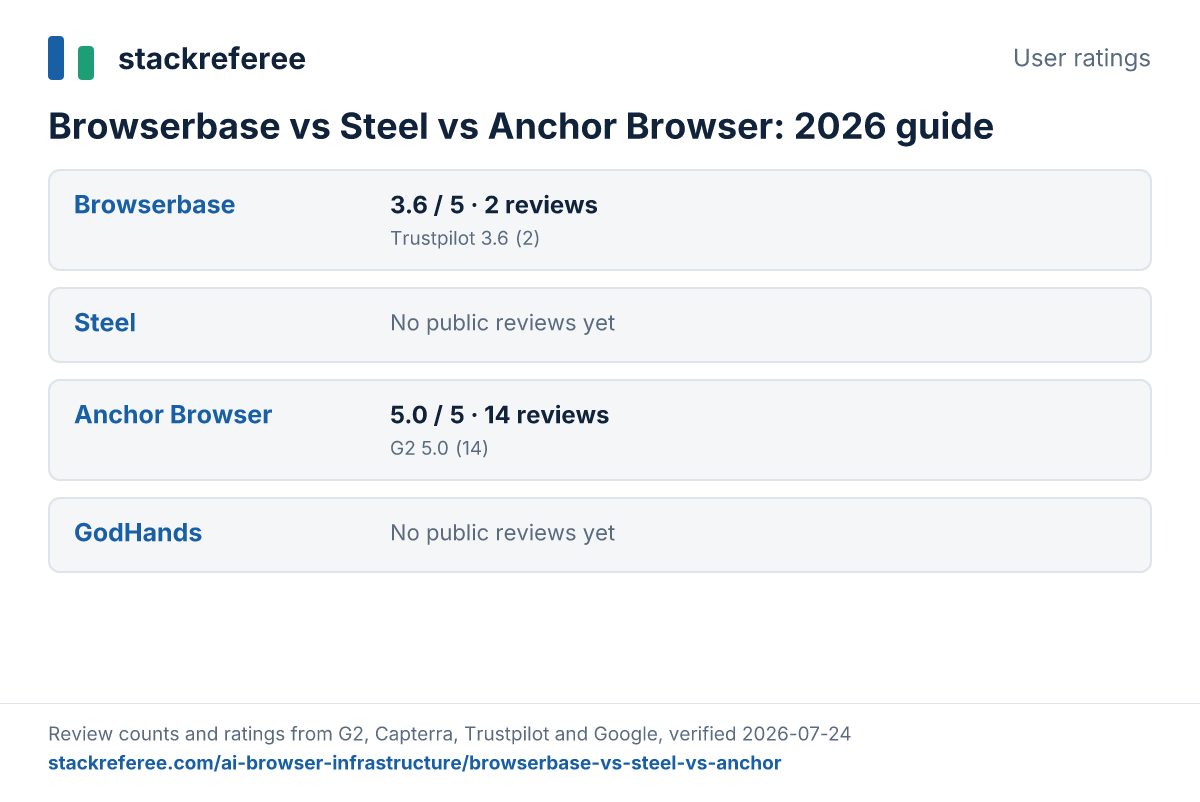
Review coverage in this young category is thin and skewed toward launch-day reactions, so read these as signals, not verdicts. We publish at least one critical quote per two positive ones per tool where such quotes exist; for Anchor Browser we found no critical feedback at all and most praise sits on the vendor's own site, so we quote only the one independent voice we found and say so plainly. GodHands has no reviews anywhere.
Steel
"beautiful docs + api ref!" - benzguo, via Hacker News
"I don't understand what problem you're solving that puppeteer doesn't already solve."
- cranberryturkey, via Hacker News
"I worry that if I use your cloud, and a lot of other people do, all of your IP addresses will get banned by all the big players." - jedberg, via Hacker News
Anchor Browser
"I'm using Anchor Browser for the browser (their API was so easy to set up so kudos to them!)" - sinanuozdemir, via Hacker News
Browserbase
"The API was easy to integrate against, and provides a feature set that is critical for numerous business use cases." - Zach Tratar, Founder of Embra, via Product Hunt
"Made it insanely easy to run real browser sessions for our AI agents. Without it, the whole system would be 10x harder to build and scale." - Elijah Muraoka, Founder of Soshi, via Product Hunt
"You can improve by adding more built in tutorials or guides for beginners...occasional slowdowns with heavy ai tasks can be frustrating." - Ashley Fliehr, via Product Hunt
"They're promoting a product they're working on with Cloudfare under the guise of it being an "open standard". Of course, in the docs, Step 1 is "Sign in with your Cloudfare account". Comes across a bit land-grabby." - ra0x3, via Hacker News
The criticism worth weighing isn't about whether these products work - it's structural. The Puppeteer question ("what does this solve?") is the build-vs-buy line every buyer should draw for themselves. The IP-reputation worry and the platform-power complaint are both about what happens when many agents share one vendor's infrastructure. Those risks are inherent to the category, not to any single product in it.
The determinism gap
Every vendor here sells reliability, yet none of the three incumbents offers deterministic execution - run the same agent task twice and you may get different paths, timings and failures. Browserbase and Steel both address this at the debugging layer with session replay and recording. Anchor goes furthest with its Web Action Cache, converting repeated workflows into cached actions, with large claimed token savings we can't verify. That's what makes the GodHands one-liner interesting despite its pre-launch ambiguity: determinism is the one axis where the incumbents are structurally weakest, and the first vendor to ship it credibly gets a real differentiator rather than a marketing adjective.
Verdict: choose by your constraint
If you want control and predictable exit options, Steel - the open-source core and self-hosting are unmatched here, and its published rates are the sharpest. If your blocker is enterprise authentication or your security team's questionnaire, Anchor Browser - but make it produce the actual SOC 2 report, not the pricing-page claim. If you want the broadest tooling around the browser and compliance you can verify today, Browserbase - and accept that its unit prices reflect that position. GodHands isn't a choice yet; it's a company to re-check in six months, ideally after its public story converges on one product.
Recap
| Steel | Anchor Browser | Browserbase | GodHands | |
|---|---|---|---|---|
| Pricing | Free + usage; $250/mo Scale | $50 - $2,000/mo + usage | $20 - $99/mo tiers + custom | Not public (pre-launch) |
| Target buyer | Control-focused engineering teams | Enterprises with auth needs | Ecosystem-first agent builders | Unknown until launch |
| Key differentiator | Open source + self-hosting | Authenticated sessions + stealth Chromium | Stagehand ecosystem + verified SOC 2 | Determinism promise, unproven |
Browse more AI browser infrastructure comparisons, read our editorial policy - vendors never buy rankings or scores here - or report a correction if you spot something off. This category's pricing changes fast; our verification dates tell you exactly when we last checked.
Frequently asked questions
What is the best browser infrastructure for AI agents?
It depends on your constraint. Browserbase has the largest ecosystem (Stagehand, Search and Fetch APIs) and verified SOC 2 Type II compliance. Steel is the open-source option you can self-host, with the lowest published per-hour browser rate at $0.08 on its Scale plan. Anchor Browser targets enterprises that need authenticated sessions and compliance claims. All three publish real pricing, which makes honest comparison possible.
Is Browserbase worth it compared to running Playwright myself?
Browserbase sells managed scale: 25 to 250+ concurrent browsers, captcha solving, stealth, proxies and session replay from $20/month plus usage. If you run a handful of scripts, self-hosted Playwright is cheaper. The value case starts when concurrency, bot detection or debugging at scale become your problem - the classic build-vs-buy line skeptics raised on Steel's own launch thread applies to the whole category.
Is Steel really open source?
The core browser API is - steel-dev/steel-browser is on GitHub under Apache 2.0 with 7.4k stars, and you can self-host it with Docker. The cloud platform around it (billing, fleets, captcha solving, stealth tiers) is Steel's commercial product. That split is standard for open-core companies, but check which features live on which side before committing.
How much does Anchor Browser cost?
Anchor's published plans run Free ($5 monthly credits, 5 concurrent browsers), Starter at $50/month (25 concurrent), Growth at $2,000/month (200 concurrent) and custom Enterprise. Usage is metered on top: $0.01 per browser created, $0.05 per browser hour, $8/GB proxy and $0.01 to $0.10 per AI step. Note the jump from $50 to $2,000 - there's no published middle tier, verified July 23, 2026.
What is the best alternative to Browserbase?
Steel is the closest direct alternative with published pricing and an open-source core you can self-host. Anchor Browser competes at the enterprise end with identity and compliance features. Browserless is an older headless-browser service we excluded as it targets classic scraping more than agent workloads. Which alternative wins depends on whether cost, control or compliance is your binding constraint.
What does GodHands actually do?
The public record is genuinely ambiguous, and we say so rather than guess. Its YC profile describes deterministic computer-use infrastructure for AI agents; its website metadata says desktop automation infrastructure; yet the site's own application content describes a documentation-drift product that syncs code and docs. The company is a two-person YC Fall 2026 team - treat any claim about the product as unconfirmed until it launches publicly.
Comments
No comments yet.