Screen vs herdr vs tmux: Terminal Multiplexers in 2026
If you've ever lost a build process because an SSH connection dropped, you already understand why terminal multiplexers exist. Screen and tmux have solved that problem for decades. The newer question, as of 2026, is what happens when the thing running inside your terminal isn't just a shell, but an AI coding agent that needs to be monitored, not just kept alive. That's the gap herdr is trying to fill, and it's the main reason this three-way comparison looks different from a typical Screen-vs-tmux writeup.
This guide compares Screen, herdr, and tmux on features, pricing, and real user feedback, so you can pick based on what you're actually running in your sessions.
Screen vs herdr vs tmux at a glance
| Screen | herdr | tmux | |
|---|---|---|---|
| Best for | Minimal, low-overhead session persistence | Visibility into AI coding agents running in terminal sessions | Scriptable, plugin-driven multiplexing |
| Starting price | $0 (Open Source) | $0 (Open Source, self-hosted) | $0 (Open Source) |
| Free plan | Yes, fully free | Yes, free for personal use and internal tooling | Yes, fully free, no account |
| Core differentiator | Small feature set, low cognitive load | Agent-state awareness + mouse-clickable UI | Plugin ecosystem + scripting API |
| GDPR / SOC 2 | Not published (self-hosted CLI tool) | Not published (self-hosted CLI tool) | Not published (self-hosted CLI tool) |
| SSO / SAML | Not published | Not published | Not published |
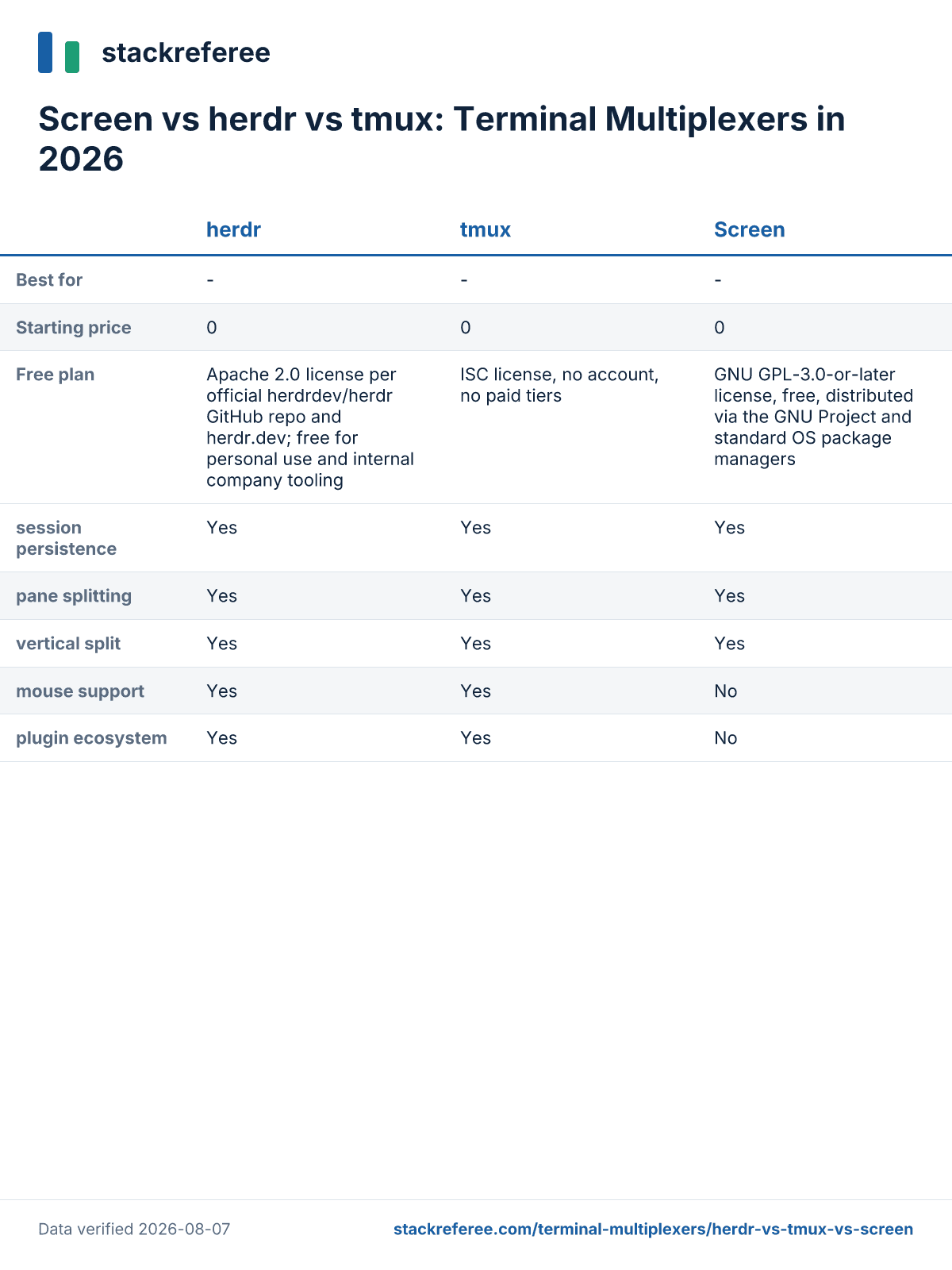
None of these three publish GDPR, SOC 2, or SSO/SAML documentation, which tracks with what they are: self-hosted command-line tools without a hosted data-processing component. If your procurement process requires those attestations on paper, you won't find them for any of the three; treat that as a shared limitation, not a reason to favor one over the others.
What is Screen?
Screen is GNU Screen, a terminal multiplexer distributed by the GNU Project under the GPL-3.0-or-later license. It lets you run multiple shell sessions inside one terminal window and detach from them without killing the underlying processes, then reattach later, including over SSH. According to Wikipedia's entry on GNU Screen, the project has continued shipping updates, with the 5.0.2 release landing July 13, 2026 and adding vertical split support alongside the horizontal splits it has offered for years. Screen is distributed through standard OS package managers and requires no account or license purchase. It's aimed at developers and sysadmins who want a small, dependable multiplexer without a large feature surface to learn.
What is herdr?
herdr describes itself as "the runtime your coding agents live on," positioning itself as a terminal-native multiplexer built around AI agent workflows rather than general-purpose session management. It's distributed under the Apache 2.0 license through the official herdrdev/herdr GitHub organization, free for personal use and internal company tooling. herdr has attracted a sizable but unverified following on GitHub, and it surfaced on Hacker News under the title "One terminal to rule them all." Its own compare page frames it as an "agent multiplexer" aimed at developers running multiple coding agents in parallel.
What is tmux?
tmux is billed on its own site as "the Terminal Multiplexer for Developers." Like Screen, it lets you split a terminal into panes and windows, detach sessions, and reattach over SSH, but it adds a plugin ecosystem and a scripting API that Screen doesn't have. It's released under the ISC license, with source hosted at tmux/tmux on GitHub, and requires no account or paid tier of any kind. Community sentiment toward tmux runs warm; a dev.to thread on "Why I love tmux" drew comments comparing it to jazz and describing it as a daily driver, one tab per active project. It's positioned for developers who want to build a customized terminal environment through configuration and community plugins.
Screen: pros and cons
Pros
Low cognitive load. Because Screen has a smaller feature set than tmux, there's less to remember, even after months away from it. Adam Conway at XDA Developers put it directly: "the cognitive load is significantly lower, and it's easy to remember how to use it even if you haven't used it in a long time." For anyone who only opens a multiplexer occasionally, that matters more than a deep feature list.
Handles unstable connections gracefully. Multiple sources point to Screen behaving better than tmux when a network connection is flaky. As the same XDA piece states: "If your connection isn't perfect, screen can be a lot nicer to deal with than tmux." If you SSH into servers from inconsistent Wi-Fi or mobile connections, this is a concrete operational advantage.
Actively maintained with modern features. Screen isn't frozen in time. Wikipedia confirms the 5.0.2 release (July 13, 2026) added vertical split support, and per the feature matrix it still covers session persistence, pane splitting, and a scripting API. It remains a maintained, current option, not a legacy holdout.
Cons
No mouse support. Per the feature matrix, Screen doesn't support mouse interaction for pane navigation or resizing, unlike both herdr and tmux. Everything has to be done through keyboard commands, which raises the learning curve for anyone coming from a GUI-first background.
No plugin ecosystem. The feature matrix also shows Screen without a plugin ecosystem. You can't extend it with community-built status bars, session managers, or copy-paste helpers the way you can with tmux, which limits how far you can customize your workflow without writing your own scripts.
Discoverability and perception problems. Screen's own name works against it. As Martin Riedel wrote on dev.to, "the name screen makes it pretty hard to find relevant information via online search engines." On top of that, an AlternativeTo commenter summed up the competitive perception bluntly: "Tmux is the hot new kid on the terminal multiplexing block. Better readability in config and code, vertical split, and actual updates!"
herdr: pros and cons
Pros
Agent-state awareness. This is the feature that sets herdr apart in the matrix: it's the only one of the three flagged as agent-state aware. A Hacker News commenter using the alias bloody-crow wrote, "I've been using Herdr since the start of the week and so far it's been the best in terms of visibility of what my agents are doing." For developers running multiple AI coding agents in parallel terminal sessions, that visibility is the core value proposition.
Mouse-clickable UI with remote-attach affordances. Another Hacker News commenter, spudlyo, noted that in herdr "everything is mouse clickable... makes nested sessions easier & has default affordances for remote SSH attach." Combined with native Windows support in the feature matrix, which neither Screen nor tmux offers, herdr targets a broader range of setups out of the box.
Free and open source under a permissive license. herdr's Apache 2.0 licensing, per the official GitHub org and herdr.dev, makes it free for personal use and internal company tooling with no cost barrier to trying it.
Cons
Unclear value proposition for existing tmux or zellij users. Not every reader is convinced herdr solves a new problem. Hacker News commenter colesantiago wrote, "I read the website and still don't understand what this solves. Doesn't tmux and zellij do all of these things?" If your team already has a tmux workflow, expect to justify the switch internally.
Skepticism about how it was built. Trust is a real cost here. Commenter ori_b dismissed it in two words: "Vibecoded. Nope." That kind of reaction, even from a single commenter, signals that some developers will need more than a product page before adopting herdr for anything production-critical.
No published enterprise pricing. If you plan to offer herdr as an externally-facing service rather than internal tooling, you'll need commercial licensing, and herdr.dev doesn't list a figure. The site only points to hey@herdr.dev for that conversation, which means budgeting for it requires a sales call before you have a number.
tmux: pros and cons
Pros
Plugin ecosystem and scripting API. The feature matrix confirms both, and it's the practical reason tmux workflows tend to be highly customized. Developers can script session layouts, add status-bar plugins, and automate window setup in ways Screen doesn't support.
Strong community affection. tmux inspires unusually warm language from its users. One dev.to commenter, patryktech, wrote: "Tmux is the best. I usually have one open terminal tab per project I am currently working on." Another, flrichar, offered a more poetic take: "Tmux is like jazz. The music never stops playing."
Free forever, no account required. tmux runs under the ISC license with zero paid tiers, per its official site, which keeps the barrier to adoption at effectively zero.
Cons
No native Windows support. Unlike herdr, tmux isn't flagged as supporting Windows natively in the feature matrix, so Windows users typically go through WSL, which introduces its own friction.
WSL copy-paste problems. Commenter waylonwalker described this directly: "Sadly copy and paste support on wsl is atrocious. Makes it hard to paste in something a team mate sent in chat." For teams that share terminal output through chat tools, that's a recurring annoyance rather than a one-off bug.
No agent-state awareness, no serial communication support. The feature matrix shows tmux lacking agent-state awareness, the same gap Screen has. And per commenter jay97, "Unfortunately, it does not support serial communication like screen does," which matters if your workflow involves serial console access.
Use-case comparison
Running AI coding agents in parallel. If your terminal sessions increasingly hold coding agents rather than plain shells, herdr's agent-state awareness is the differentiator none of the others offer. Recommendation: herdr, especially if you're already comfortable with its Apache 2.0 self-hosted model.
Building a highly customized, scriptable workflow. If you want to extend your multiplexer with plugins, automate session layouts, and lean on a scripting API, tmux's ecosystem is the most mature of the three per the feature matrix. Recommendation: tmux, particularly for teams with existing dotfiles and tmux plugin investments.
Working over unreliable connections with minimal setup. If you SSH from inconsistent networks and want to remember as few commands as possible, Screen's small feature set and connection-handling reputation make it the lower-friction option. Recommendation: Screen, especially for sysadmins managing legacy or minimal-footprint servers.
Pricing
Screen pricing
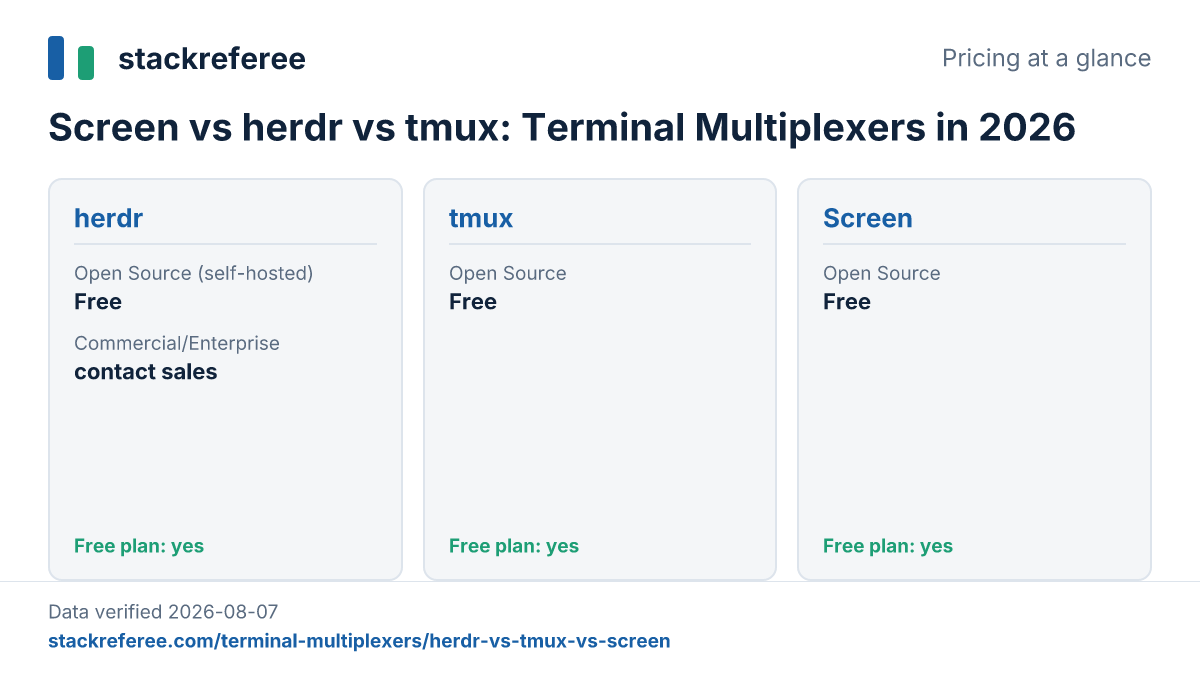
Screen has a single tier: Open Source, $0 forever, distributed under the GNU GPL-3.0-or-later license through the GNU Project and standard OS package managers. There is no paid tier, no account, and no upsell path.
Pricing verified on August 7, 2026
herdr pricing
herdr publishes two tiers. The Open Source (self-hosted) tier is $0 forever, licensed under Apache 2.0 per the official herdrdev/herdr GitHub repo and herdr.dev, free for personal use and internal company tooling. The Commercial/Enterprise tier has no published price; herdr.dev directs those inquiries to hey@herdr.dev, and that path is needed if you plan to offer herdr externally as a service rather than use it internally.
Pricing verified on August 7, 2026
tmux pricing
tmux has one tier: Open Source, $0 forever, under the ISC license. There's no account requirement and no paid tier of any kind.
Pricing verified on August 7, 2026
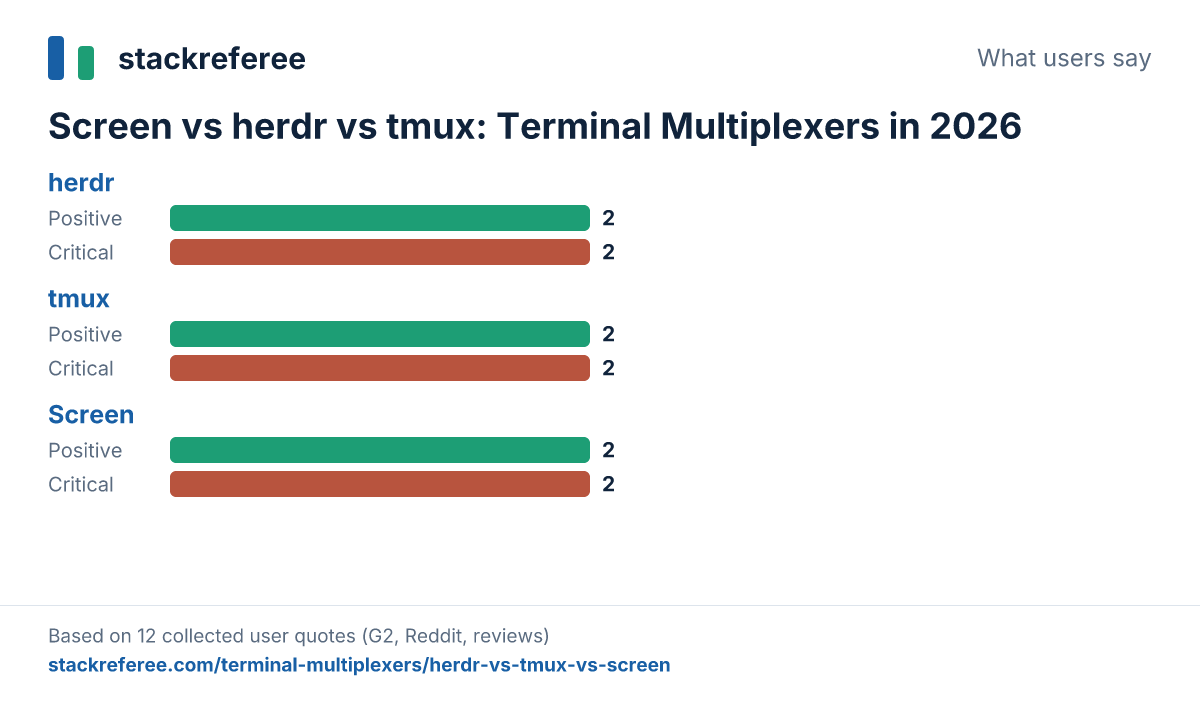
What users say
Screen
"Because screen doesn't have a lot of features, the cognitive load is significantly lower, and it's easy to remember how to use it even if you haven't used it in a long time." - Adam Conway via XDA Developers
"If your connection isn't perfect, screen can be a lot nicer to deal with than tmux." - Adam Conway via XDA Developers
"One thing that bothered me from the beginning was, that the name screen makes it pretty hard to find relevant information via online search engines." - Martin Riedel via dev.to
herdr
"I've been using Herdr since the start of the week and so far it's been the best in terms of visibility of what my agents are doing." - Hacker News commenter (bloody-crow) via Hacker News
"everything is mouse clickable... makes nested sessions easier & has default affordances for remote SSH attach" - Hacker News commenter (spudlyo) via Hacker News
"I read the website and still don't understand what this solves. Doesn't tmux and zellij do all of these things?" - Hacker News commenter (colesantiago) via Hacker News
tmux
"Tmux is the best. I usually have one open terminal tab per project I am currently working on" - dev.to commenter (patryktech) via dev.to
"Tmux is like jazz. The music never stops playing." - dev.to commenter (flrichar) via dev.to
"Sadly copy and paste support on wsl is atrocious. Makes it hard to paste in something a team mate sent in chat." - dev.to commenter (waylonwalker) via dev.to
Verdict per use case
Choose Screen if you manage servers over connections you don't fully trust, or if you want a multiplexer with the smallest possible learning curve. Its lower cognitive load and better behavior on flaky connections, per XDA Developers, make it a reasonable default for occasional, low-frills use, even though it lacks mouse support and a plugin ecosystem.
Choose herdr if your terminal sessions increasingly run AI coding agents rather than plain interactive shells. Its agent-state awareness and mouse-clickable, remote-attach-friendly interface address a problem neither Screen nor tmux was built for, though you should weigh the Hacker News skepticism about its origins and the fact that enterprise pricing isn't published anywhere.
Choose tmux if you want the deepest customization through plugins and scripting, and you're building a long-term, keyboard-driven terminal workflow. It's free, well-loved by its community, and the most extensible of the three, but expect friction if your team works through WSL.
For a broader look at how these tools stack up against other developer infrastructure choices, see our Terminal Multiplexers comparisons hub. If your workflow already involves running coding agents across multiple environments, our guide to Browserbase vs Steel vs Anchor Browser: 2026 guide covers a related layer of AI agent infrastructure worth checking.
Recap table
| Screen | herdr | tmux | |
|---|---|---|---|
| Price | $0 (GPL-3.0-or-later) | $0 self-hosted / contact sales for enterprise | $0 (ISC license) |
| Best audience | Sysadmins and developers on unstable connections or legacy servers | Developers running AI coding agents in parallel sessions | Developers building customized, scriptable terminal workflows |
| Core differentiator | Minimal feature set, low cognitive load | Agent-state awareness + mouse-clickable UI | Plugin ecosystem + scripting API |
All three tools in this comparison are free and open source, so there's no cost trade-off to weigh, only a workflow one. Pick based on what actually lives in your terminal sessions today: plain shells over shaky connections point to Screen, scripted and plugin-heavy setups point to tmux, and coding agents you need to monitor point to herdr.
This comparison draws exclusively from the sources cited above; see our editorial policy for how we select and verify sources. None of the mentions here are sponsored.
Frequently asked questions
Is herdr better than tmux for AI coding agents?
herdr is the only one of the three with built-in agent-state awareness, so you can see what a coding agent is doing inside a session without digging through scrollback. One Hacker News commenter called it 'the best in terms of visibility of what my agents are doing.' tmux has no equivalent feature; you'd need custom scripting to approximate it.
What is the difference between tmux and GNU Screen?
Both persist terminal sessions over SSH and support pane splitting, but tmux ships a plugin ecosystem and a scripting API that Screen lacks. Screen has a smaller feature set, which several users describe as lower cognitive load. One AlternativeTo commenter, on Screen's alternatives page, described tmux as having 'better readability in config and code' and more frequent updates.
Is herdr free to use?
Yes. herdr is licensed under Apache 2.0 and is free for personal use and internal company tooling, according to the official herdrdev/herdr GitHub repository and herdr.dev. There's no published price for commercial or enterprise licensing; herdr.dev directs those inquiries to hey@herdr.dev instead of listing a figure.
Does tmux work on Windows?
Not natively, based on the feature comparison in this article: tmux is not flagged as having native Windows support, while herdr is. Windows users typically run tmux through WSL, which introduces its own friction; one dev.to commenter called copy-paste support on WSL 'atrocious' when pasting content shared by teammates in chat.
Why do people still use GNU Screen instead of tmux?
Two reasons show up repeatedly in user feedback: lower cognitive load because Screen has fewer features to remember, and better behavior over unstable connections. As one XDA Developers piece put it, 'if your connection isn't perfect, screen can be a lot nicer to deal with than tmux.'
Does herdr replace tmux or zellij?
Not necessarily for everyone. herdr adds agent-state awareness, mouse-clickable navigation, and default SSH remote-attach affordances on top of multiplexer basics, but at least one Hacker News commenter was unconvinced, asking 'Doesn't tmux and zellij do all of these things?' Whether it replaces your current setup depends on whether you're running coding agents inside your terminal sessions.
What is the best terminal multiplexer for SSH connections that drop often?
Based on user feedback in this comparison, GNU Screen has a reputation for handling flaky connections gracefully, thanks to its minimal feature set. tmux and herdr both support SSH remote reattachment as well, per the feature matrix, but no source in this research specifically credits them with better drop-resilience than Screen.
Comments
No comments yet.